Reviewed by PRO MAX HVAC & Appliance Repair technicians, EPA 608 certified
A smart thermostat that keeps rebooting on an older furnace is almost always short on power because there is no C-wire. Without that common wire, the thermostat borrows a trickle of power through the heating or cooling wire, and that supply drops the moment the furnace starts. The thermostat browns out, restarts, and sometimes takes the heat call down with it.
The upgrade is worth getting right, and current smart thermostat offers from SMUD change through the year, so check them before you buy. ENERGY STAR estimates that its certified smart thermostats save about 8 percent on heating and cooling bills, but only for a thermostat that stays on, stays online and keeps its schedule. One that reboots every morning loses its schedule changes and its savings.
Why Does a Smart Thermostat Need a C-Wire?
A smart thermostat runs a screen and a Wi-Fi radio all day, and a plain battery cannot keep up. The furnace or air handler has a small 24-volt transformer that powers the thermostat circuit. The R wire carries that power to the thermostat, and the C, or common, wire carries it back to complete the circuit.
Older thermostats only needed to open and close a switch, so many homes were wired without a C-wire. Smart thermostats without one use a trick called power sharing: when the system is idle, they leak a tiny current through the heat or cooling wire. When the system starts, that path closes and the thermostat runs on its internal battery until the cycle ends. On long cycles, the battery runs down and the thermostat restarts.
Signs the Problem Is Power, Not Wi-Fi
The timing is the tell.
If the screen goes blank or restarts right as the heat comes on, it is power. Other signs point the same way: a low battery warning on a thermostat that has no batteries to replace, Wi-Fi that drops in the evening when the furnace runs longest, or a furnace that clicks on and off for no reason. Power sharing can confuse some control boards into starting a cycle and stopping it again.
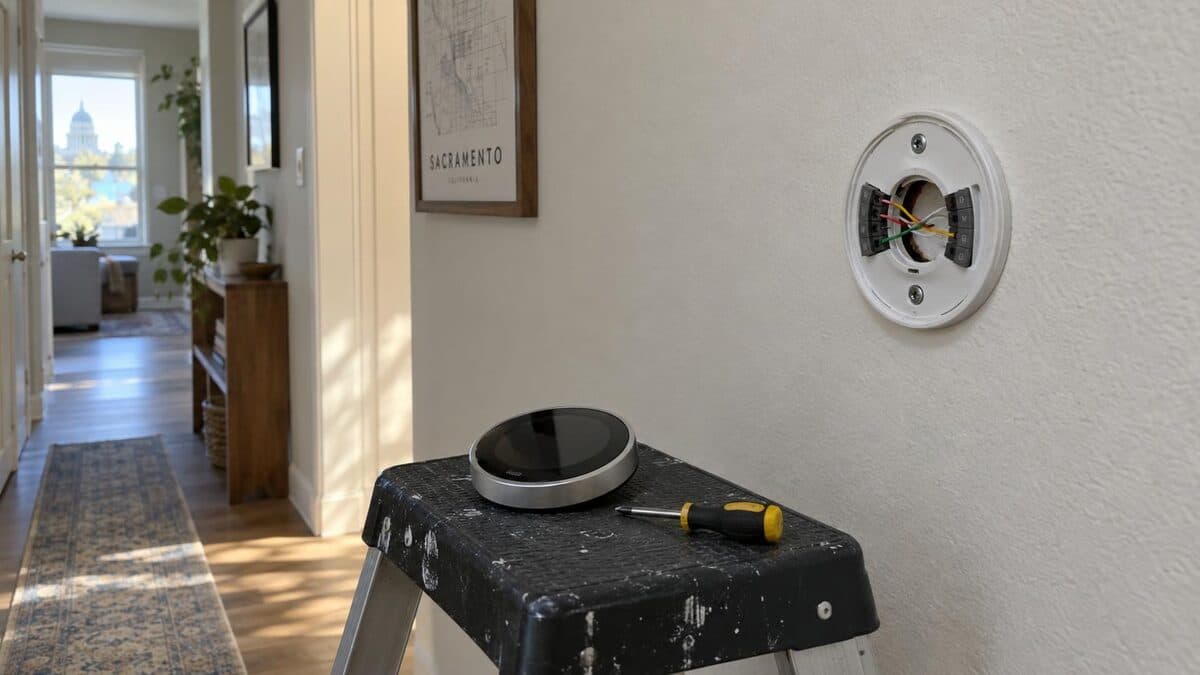
Here is a typical first-cold-week call in Rancho Cordova. A 1990s tract home has its original furnace and a new smart thermostat the owner installed in the spring. It worked fine all summer on short AC cycles. The first cold mornings brought long heating cycles, and the thermostat now restarts two or three times before 7 a.m. Behind the wall plate there are five wires in the bundle and only four connected.
Check the thermostat itself before you open any walls. Most have a wiring or technical info screen that shows whether a C terminal is connected and what voltage it sees. A pending software update forces a restart too, but that happens once, not every morning, and a weak router signal drops Wi-Fi without blanking the screen.
Fix 1: Connect an Unused Spare Wire
Many homes already have a spare wire folded back in the wall, often blue or black. Before you touch anything, switch off the furnace at its service switch or breaker. Pull the thermostat off its base and look for a conductor that is not connected to any terminal.
If you find one, it has to be connected at both ends: to the C terminal on the thermostat and to the C or COM terminal on the furnace control board. When the wire is there, this is the best fix. It costs nothing and gives the thermostat steady power for its whole life.
It is also the fix most people skip, because the spare wire is easy to miss.
Fix 2: Install the Adapter Kit
If there is no spare wire, most smart thermostat makers sell a power adapter kit that installs at the furnace. It uses the existing wires to carry a common signal, and the thermostat stops borrowing power. The kit is small and inexpensive, but it goes inside the furnace cabinet next to the control board, so follow the maker's instructions closely or have a technician install it.
Fix 3: Run a New Thermostat Cable
The most complete fix is a new five-wire or eight-wire thermostat cable from the furnace to the thermostat. In a single-story home with an attic furnace, that is often a short job. In a two-story home or a finished wall, it can mean fishing cable through framing, and that is where a technician earns the fee. A new cable also leaves spare wires for a future heat pump or a humidifier.
When to Call a Pro
Call when you cannot find a spare wire, when the furnace control board has no clearly marked C terminal, or when the thermostat still restarts after you add a C-wire. Call too if the furnace short cycles or the fan runs constantly after a thermostat swap, since a wire on the wrong terminal causes both.
PRO MAX HVAC & Appliance Repair handles thermostat installation and furnace wiring across the Sacramento area, including Rancho Cordova and Fair Oaks. Call (916) 234-5925 or book through our online booking page.
Check a smart thermostat that keeps rebooting
Watch when it reboots
Note whether the screen goes blank or restarts right when the heat or AC starts; that timing points to a power problem.
Check the wiring screen
Open the thermostat's wiring or technical info screen and look for a connected C terminal and the voltage it reports.
Turn off the system power
Switch off the furnace or air handler at its service switch or breaker before you remove the thermostat faceplate or open the furnace door.
Look for a spare wire
At the wall plate, look for an extra wire folded back into the wall that is not connected to any terminal.
Choose a fix
Connect the spare wire as a C-wire at both ends, install the thermostat maker's adapter kit, or have a technician run a new cable.
Sources
Need appliance repair in the Sacramento area?
Same-day service, 180-day warranty, all major brands. PRO MAX HVAC & Appliance Repair — Carmichael, CA.